Do signals tell me what to buy?
No. They flag unusual activity. You still have to read the company, the news, and your own constraints.
PRODUCT — WATCH
A signal feed for the names and sectors you already care about — not a firehose of every tick in the market.
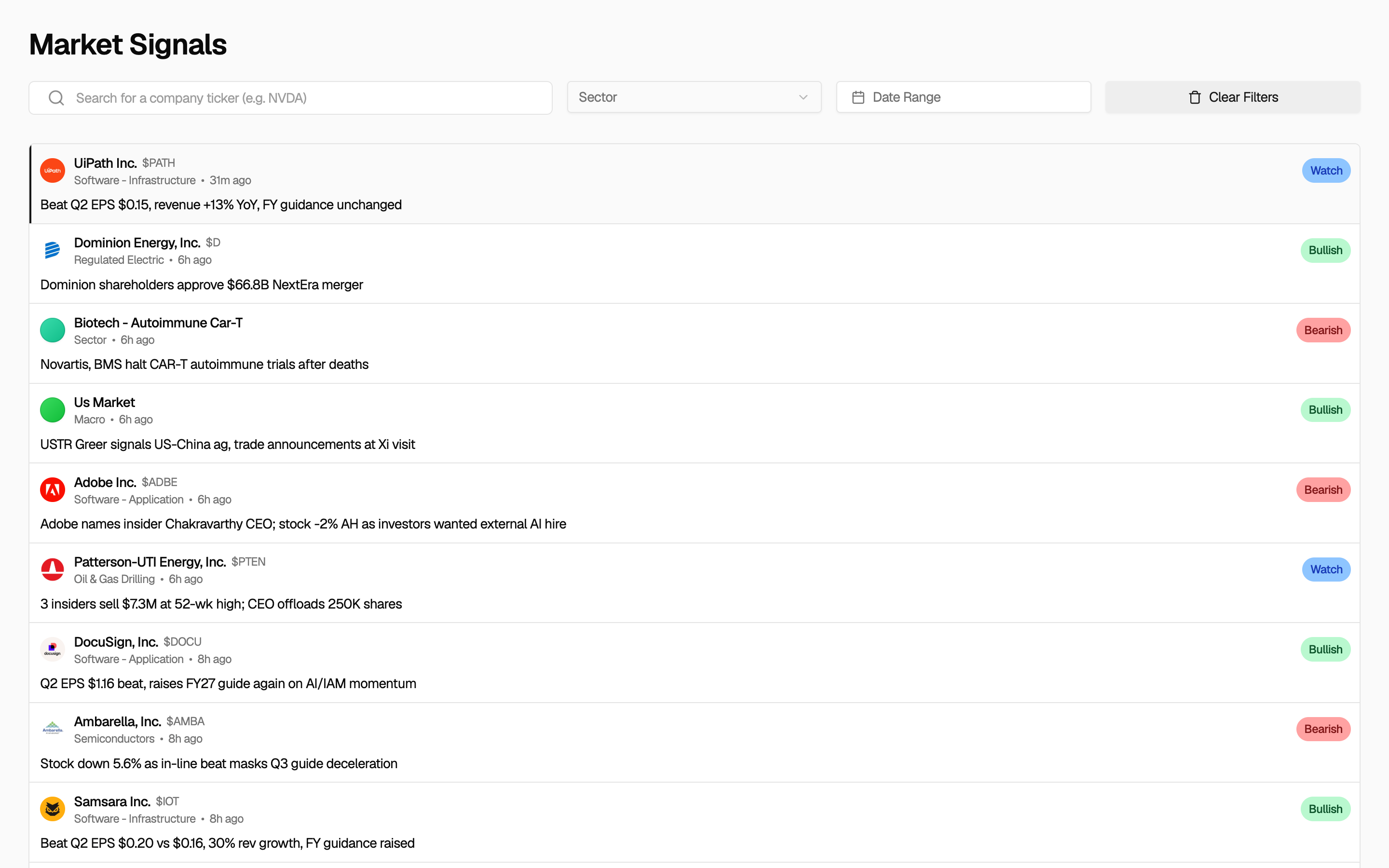
Most retail research starts after the move is already on Twitter. Signals are meant to surface unusual activity while you still have time to look at the company, not after you have already missed the session.
In the app you can filter the feed by ticker, sector, and date range. You can also tie alerts to holdings you imported. That is the difference between a firehose and a watchlist you actually maintain.
A signal is a prompt, not a thesis. The useful next click is the recap, the news story, or the company page for that ticker. If you treat the feed as a buy list, you are using the wrong product.
Ryxel is not a broker tape and not Level 2. Confirm prints at your broker if you are about to trade. The job here is to notice what was unusual in the names you already decided to follow.
Step 1
Set tickers or sectors you already care about, and a date range if you are catching up after a weekend. Do not start from the entire tape.
Step 2
Read the signal card, then open the detail. You are asking what moved and whether it is already explained.
Step 3
If volume is unusual, see whether earnings, a filing, or the session narrative already covers it. Most 'mystery' prints have a story.
Step 4
If the name is in your book, or you might add it to a watchlist, read the 10-K summary and financials. The signal was the door, not the research.
Signals help people who already have names they follow and a limited morning. They do not help people who want a robot to trade for them.
A good fit if
The feed is useful when it is scoped. A generic 'market movers' list is what your broker already shows.
Ten minutes to see what was unusual, then one company page, is a real weekday routine.
If a signal sends you into news and filings, it did its job.
Not the right tool if
Use your broker for the tape. This is a research feed.
There is no execution hook and we will not add a copy-trade bot.
You choose sectors and tickers. The feed is not trying to notify you about every name on the tape.
If you imported holdings, you can watch alerts that relate to those names instead of building a second watchlist by hand.
A signal is a prompt to read the recap, the filing, or the news — not a finished thesis.
Signals sit next to recaps, news, and company research so you do not jump between five products to explain one move.
Open the feed on the sectors you follow, mark two names that look unusual, then read the recap or those company pages. The rest of the tape can wait.
See whether anything you already own printed unusual volume or a sharp move. That is the difference between a generic alert and a portfolio-scoped one.
Follow one industry for a week of earnings. Filter to that sector so you are not drowning in megacap noise.
Your broker showed a red day. Open Signals for that ticker and the date, then jump to news. You are reconstructing a cause, not hunting a new idea.
Set a date range for the week you missed. Skim, keep two names, delete the rest from your head.
No. They flag unusual activity. You still have to read the company, the news, and your own constraints.
Yes. After you import or build a portfolio, you can watch signals tied to those holdings instead of the whole market.
Yes. Those are the filters on the Signals page. Use them. An unfiltered feed is how people burn the morning.
No. Signals summarize unusual volume and price movement. They are not a professional market-data terminal or a live order book.
Some views in the app are subscription-gated. Sign in and you will see what your account can open. Registration is free while we are in beta.
No. Ryxel is a research and tracking tool. It does not recommend trades, manage money, or act as a broker or registered investment adviser. You decide what to do with the information.
Create an account to use signals, recaps, news, and company research on the names you care about.
Ryxel is a research tool. It is not financial advice, a broker, or an investment adviser.